Product Description
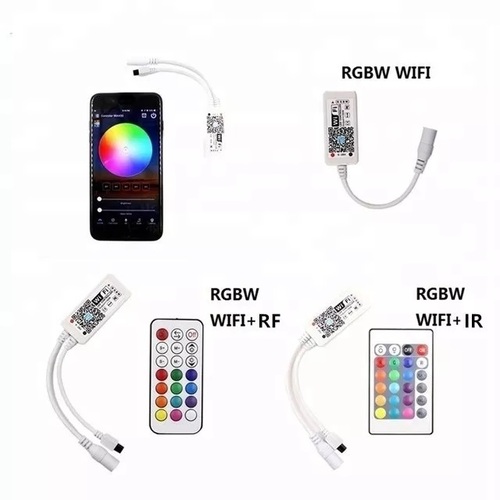
6 types WIFI controller ALL Work with Amazon Alexa and Google Home and IFTTT Applets
1. MINI WIFI RGB (4pin ,no remote)
2. MIN WIFI RGBW (5pin,no remote)
3. IR WIFI RGB (4pin,has IR24key remote)
4. IR WIFI RGBW (5pin,has IR24key remote)
5. WIFI RGB (4pin,has RF21key remote)
6. RF WIFI RGBW (5pin,has RF21key remote)
Pls noted:IR remote control distanc is about 3-5meters. and RF remote control distance is about 20meters
Alexa Support Commands:
1. Alexa, turn{light name} on/off
2. Alexa, set {light name} to 1%-100%
3. Alexa, dim/brighten {light name}
4. Alexa, set {light name} to red...
5. Alexa, change the {light name} to the color blue...
6. Alexa, set {light name} the to daylight
Google Home Support Commands:
Say Ok Google or Hey Google, then..
Turn on
Dim
Brighten
Set to 50%
Dim/Brighten by 50%
Turn color
Turn on/off all the lights
Is on
How to Work with Amzaon Alexa and Google Home
1. You can see the details from the Smart Phone App:Magic Home Pro
2. The App langue depends on your phone lang
3. You can contact us any time
Product Features
1. WiFi smartphone APP control, support Android/IOS system
2. 16 million colors
3. Sync control by group
4. Custom mode
5. Timer mode
6. Kickstart your party
7. Light dancing with music
8. Save favourite colors
9. Remote control by Internet
10. Remote inpute:CR2025(Do not incude)
11. Used for RGBW/RGB/CW/WW LED strip,LED panel light,LED celling light or other LED light,which is 12-24V
Integrated Voice and App ControlEffortlessly manage your home or office devices using voice assistants like Amazon Alexa and Google Home, or through your preferred app. Control lights, appliances, and create scenes or groups for coordinated automation, all with the flexibility of remote, timer, or countdown settings. Real-time feedback keeps you updated on device status at all times.
Robust Safety and Compliance FeaturesEach controller is designed with your safety in mind, offering overload, surge, and overheat protection depending on model. Durable flame-retardant housings and compliance with local electrical codes ensure a secure and reliable device, suited for various environments and applications.
Flexible Installation and CompatibilityChoose from DIN rail, wall-mount, inline, or socket plug models, with neutral wiring typically required. Controllers come in 1, 2, or 4 channels to accommodate different automation setups. Supported by multiple smart home platforms, integration is smooth and future-proof with easy OTA firmware updates.
FAQ's of 6 types WIFI controller ALL Work with Amazon Alexa and Google Home and IFTTT Applets:
Q: How do I set up these WiFi controllers with Amazon Alexa or Google Home?
A: After installing the controller, connect it to your 2.4GHz WiFi network using the compatible app (Tuya, Smart Life, eWeLink, or specified brand). Then, link your app to Amazon Alexa or Google Home by following in-app instructions. This allows you to control devices via voice commands and integrate with your smart home ecosystem.
Q: What types of devices or appliances can be controlled with these controllers?
A: These WiFi controllers are suitable for managing a variety of devices, including lighting systems, fans, small appliances, security setups, and office equipment. Ensure the device's power and current ratings do not exceed the controller's specifications (10A/16A per channel, depending on model).
Q: When is it necessary to use a neutral wire during installation?
A: Most models require a neutral wire for proper operation and power supply. Please refer to the model-specific installation guide to confirm wiring requirements. If unsure, consult a qualified electrician to ensure safe and code-compliant installation.
Q: Where can these controllers be installed?
A: These controllers are designed for versatile mounting, including DIN rail, wall-mount, inline connections, or plug-socket types. They have an enclosure rating of IP20 or higher, making them suitable for indoor environments in homes, offices, or commercial spaces.
Q: What is the process for updating the firmware on these WiFi controllers?
A: Firmware upgrades are available over-the-air (OTA) and can be initiated through the supported app. You will receive notifications when updates are available, ensuring your device remains up-to-date with the latest features and security enhancements.
Q: How can I benefit from scene and group device controls?
A: Scene and group controls enable you to automate multiple devices with a single action or schedule. For instance, you can create a 'Bedtime' scene to turn off all lights and appliances, improving convenience and energy efficiency.

 English
 Spanish
 French
 German
 Italian
 Chinese (Simplified)
 Japanese
 Korean
 Arabic
 Portuguese












 Send Inquiry
 Send Inquiry